I ran into compatibility issues when installing a stand alone version of Visio Professional on a new Windows 10 computer with Office 365 installed. Install complained of compatibility issues with the Office Click-to-Run Extensibility Component.
I solved the issue by going to account.microsoft.com. I had registered my Visio product there 4 years ago and an install link and product key were displayed there. I clicked the install link and Visio installed without issue. Office applications still work too.
Saturday, December 14, 2019

Monday, July 16, 2018
Google Analytics Exceptions
You may have noticed some exceptions in the Visual Studio output window when using Google Analytics. I had 3 exceptions of "Automation server can’t
create object" and one exception of "Unable to get property getRandomValues of undefined or null reference".
Automation Server Can't Create Object
The Google Analytics javascript in analytics.js tries to determine what version of ShockwaveFlash is installed on your computer by trying to create objects of three versions of ShockwaveFlash and use an instance even if it's null which throws an exception. The exceptions are caught and not re-thrown so there are no issues, but you will see the exceptions in the Visual Studio output window.Here is the code of interest:
function fc() {
var a, b, c; if ((c = (c = O.navigator) ? c.plugins : null) && c.length)
for (var d = 0; d < c.length && !b; d++) {
var e = c[d]; - 1 < e.name.indexOf("Shockwave Flash") && (b = e.description)
}
if (!b) try {
a = new ActiveXObject("ShockwaveFlash.ShockwaveFlash.7"), b = a.GetVariable("$version")
} catch (g) {}
if (!b) try {
a = new ActiveXObject("ShockwaveFlash.ShockwaveFlash.6"), b = "WIN 6,0,21,0", a.AllowScriptAccess = "always", b = a.GetVariable("$version")
} catch (g) {}
if (!b) try {
a = new ActiveXObject("ShockwaveFlash.ShockwaveFlash"), b = a.GetVariable("$version")
} catch (g) {}
b &&
(a = b.match(/[\d]+/g)) && 3 <= a.length && (b = a[0] + "." + a[1] + " r" + a[2]);
return b || void 0
};
Unable to get property getRandomValues
An analytics.js function relies on an exception to determine if the .crypto object is
defined. The function returns a value in the catch().
Again, the exceptions is caught and not re-thrown so there are no issues, but you will see the exceptions in the Visual Studio output window.
Again, the exceptions is caught and not re-thrown so there are no issues, but you will see the exceptions in the Visual Studio output window.
Here is the code of interest:
return Math.round(2147483647 * Math.random())
},
Bd = function() {
try {
var a = new Uint32Array(1);
O.crypto.getRandomValues(a);
return a[0] & 2147483647
} catch (b) {
return hd()
}
Thursday, May 3, 2018
Format Phone Number
You have nine digits but you want to format the phone number for a readable display.
string strContactPhone = "123456789";
Int64 phoneInt;
if (Int64.TryParse(strContactPhone, out phoneInt)) ;
{
strContactPhone = String.Format("{0:(###) ###-####}", phoneInt);
}
Visit www.BlueCanyonSoftware.com for custom software development.
Sunday, April 22, 2018
View GAC from Visual Studio
What assemblies are running in the Global Application Cache (GAC)?
You can use the gacutil utility to view the GAC but it's really convenient to view GAC assemblies in Visual Studio.
Open the Assembly Explorer.
Click the "Open from GAC" button as shown in this image.
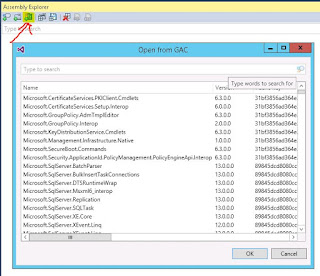
You can use the gacutil utility to view the GAC but it's really convenient to view GAC assemblies in Visual Studio.
Open the Assembly Explorer.
Click the "Open from GAC" button as shown in this image.

Visit www.BlueCanyonSoftware.com for custom software development.
Friday, August 4, 2017
Monday, April 24, 2017
Session is Null with SQL Server Session Mode
The Problem
Session variable works fine with InProc Session Mode but is null when you switch the Session Mode to SQLServer mode.You may see the following exception.
"Unable to serialize the session state. In 'StateServer' and 'SQLServer' mode, ASP.NET will serialize the session state objects, and as a result non-serializable objects or MarshalByRef objects are not permitted. The same restriction applies if similar serialization is done by the custom session state store in 'Custom' mode."
Make sure you check the inner exception to see which class needs to be changed to Serializable.
Review all the data you have stored in Session variables to verify the data is serializable. .NET knows how to automatically serialize the simple built in types like string, enum, integer, etc. Any classes you create are NOT serializable by default. Fortunately, you can make your classes serializable with a simple class attribute of [Serializable] like this.
[Serializable]
public class Address
{
public int nStreetNum;
public string strStreetName;
}
[Serializable]
public class Customer
{
public string strFirstName;
public string strLastName;
public Address Addr; // The Address class must be serializable.
public Customer(string FirstName, string LastName, Address theAddr)
{
strFirstName = FirstName;
strLastName = LastName;
Addr = theAddr;
}
}
Your class must meet these requirements to be serializable:
- Your class must have the Serializable attribute
- Any classes it derives from must have the Serializable attribute.
- All class member variables must be serializable types. For example, the Address type used for Customer Addr member variable must also be serializable.
Visit www.BlueCanyonSoftware.com if you need custom software development.
Saturday, April 8, 2017
Get Session Variable and Check for Null
Accessing a Session variable that hasn't been created causes a null exception. You can use the C# null-coalescing(??) or 'as' operators to simplify and avoid a null exception.
First two examples yield the same result;
myClassObj will receive the myClassObj stored in the Session variable if it exists; otherwise null.
myClassObj will receive the myClassObj stored in the Session variable if it exists; otherwise null.
With ?? Operator
MyClass myClassObj = (MyClass)Session["mySessionName"] ?? null;With as Operator
MyClass myClassObj = Session["mySessionName"] as MyClassWith Both Operators
string strMyClass = Session["mSessionName"] as string ?? "";Saturday, January 21, 2017
Cannot Drag Windows Explorer to Another Monitor
Problem: Windows Explorer window cannot be dragged to another monitor.
Solution: Turning Snap feature off and then back on solved the issue.
- Right-click on your desktop
- Select Display Settings > Multitasking > Snap
- Slide Snap to off and then back on again. I have the remaining three options turned on also.
Turn Snap feature off if that doesn't work.
Visit www.BlueCanyonSoftware.com if you need custom software development.
Friday, January 13, 2017
RadWindowManager in User Control Can Cause Confusion
I had a RadWindowManager in a user control that was loaded dynamically in an aspx page which also had it's own RadWindowManager. So now there are two RadWindowManagers on the page after the user control was loaded.
The following comes from a post at a Telerik forum:
- the radopen() function can be used only when a RadWindowManager is declared on the page.
- If there are multiple RadWindowManagers on the page, radopen() will use the first rendered manager.
Visit www.BlueCanyonSoftware.com if you need custom software development for your business.
Thursday, January 12, 2017
C# Language Specification
The C# language specification is available online and may even be on your hard drive right now.
Visit www.BlueCanyonSoftware.com if you need custom software development.
Wednesday, September 28, 2016
RadGrid NoRecordsTemplate Not Showing
Add a NoRecordsTemplate setting to the MasterTableView of your Telerik RadGrid to provide an informative display when your grid DataSource has no records.
The NoRecordsTemplate will only show when your grid DataSource indicates there are no records.
I prefer to initialize the grid DataSource to empty at the start of the NeedDataSource event handler and replace the DataSource value if data is available for the grid.
For example, I use the following line to set myGrid DataSource to indicate no records.
myGrid.DataSource = new object[0]{};
Contact Blue Canyon Software if you need custom software development for your business.
The NoRecordsTemplate will only show when your grid DataSource indicates there are no records.
I prefer to initialize the grid DataSource to empty at the start of the NeedDataSource event handler and replace the DataSource value if data is available for the grid.
For example, I use the following line to set myGrid DataSource to indicate no records.
myGrid.DataSource = new object[0]{};
Contact Blue Canyon Software if you need custom software development for your business.
Thursday, May 5, 2016
Performance Tuning for ASP.NET
Found a good article at c-sharpcorner.com with lots of suggestions for improving performance of an ASP.NET web site. Click this link to see the article.
Visit www.BlueCanyonSoftware.com if your business needs custom software development.
Tuesday, March 29, 2016
Case Insensitive SQL Search for Missing Values in Another Table
Problem:
You need to compare two tables to find values in one table that are missing in the other table. SQL server default is case insensitive so if "Dog" is in table A and "DOG" is in table B there is a match.
Solution:
You need to set the COLLATE value to get your desired result of a case sensitive comparison.
We will compare two tables, The graniteRequested table has a 'Color' column. The colorGranite table has a 'color' column.
This SQL query will look for colors that are in the graniteRequested table but not in the colorGranite table.
SELECT DISTINCT gR.Color
FROM graniteRequested gR
WHERE gR.Color NOT IN
(SELECT colorGranite.color Collate SQL_Latin1_General_CP1_CS_AS FROM colorGranite)
Collate SQL_Latin1_General_CP1_CS_AS makes this a case sensitive search.
Visit www.BlueCanyonSoftware.com if you need custom software development for your business.
Tuesday, February 2, 2016
List SQL Server Database Tables and Columns
Query for Showing All Tables and Columns in Your Database
Do you need a list of all the tables in your database and their columns?Use SQL Server Management Studio to connect to your database. Execute this query, substituting your database name in the USE statement.
USE YOUR_DATABASE_NAME;
SELECT OBJECT_SCHEMA_NAME(T.[object_id],DB_ID()) AS [Schema],
T.[name] AS [table_name], AC.[name] AS [column_name],
TY.[name] AS system_data_type, AC.[max_length],
AC.[precision], AC.[scale], AC.[is_nullable], AC.[is_ansi_padded]
FROM sys.[tables] AS T
INNER JOIN sys.[all_columns] AC ON T.[object_id] = AC.[object_id]
INNER JOIN sys.[types] TY ON AC.[system_type_id] = TY.[system_type_id] AND AC.[user_type_id] = TY.[user_type_id]
WHERE T.[is_ms_shipped] = 0
ORDER BY T.[name], AC.[column_id]
Right-click on the query results grid and select "Save Results As..."
Choose the .csv file format so you can open the file in Excel.
Visit www.BlueCanyonSoftware.com if you need custom software development for your business.
Wednesday, December 23, 2015
Copy SQL Server Database
- Create a backup on the source SQL Server
- Copy the .bak file to the destination computer.
- Note the file name and location of the .bak file on the destination computer.
- Execute this SQL Query in the destination computer
RESTORE DATABASE <YourDatabase>
FROM DISK='<the path to your backup file>\<YourDatabase>.bak'
Visit Blue Canyon Software if you need custom software for your business.
Tuesday, December 1, 2015
Best Practices for Sharing Facebook Posts to Your Website
Facebook uses meta tags in your website to manage posts that link to your website. Visit Sharing Best Practices for Websites and Mobile Apps to learn more.
Visit Facebook Object Debugger to evaluate your website.
Visit Blue Canyon Software if you need custom software development for your business.
Visit Facebook Object Debugger to evaluate your website.
Visit Blue Canyon Software if you need custom software development for your business.
Thursday, October 1, 2015
Setting Focus for Barcode Scan Input

Barcode scanners read barcode data and "write" the data into an area waiting to receive the data. You could open Notepad and scan a barcode right into notepad. On a web site, we need a textbox or other input control to receive the scanned data.
We could force our users to physically click a text box before scanning but it is normally better to have the input control selected by the software so the user can scan without repeatedly clicking an input control.
We could force our users to physically click a text box before scanning but it is normally better to have the input control selected by the software so the user can scan without repeatedly clicking an input control.
The Solution Seems Obvious Unless Your Using IE9
A couple of solutions seem to be obvious choices.
- Call the Focus() function on the input control in the OnPreRender event handle.
- Call the Focus() function on the input control using JavaScript in the window onload() event.
Neither one of these solutions work on the page_load() when the input control is AJAX enabled. The window onload() event is raised before AJAX enabled controls are intialized.
And the Answer Is ...Sys.Application.add_load()
We need to find a place to set the focus after ALL controls have been created and initialized. We need this event to be raised after every AJAX call as well. Add this code in a <script></script> section in your .ASPX page
Sys.Application.add_load(applicationLoadHandler);
function applicationLoadHandler() {
// Call function to set focus on the scanning input control.
SetFocusForScan();
}
Thursday, September 24, 2015
RadAjaxManager and ClientIdMode="Static"
You may encounter this error when using the RadAjaxManager with controls that have their ClientIdMode set to Static.

ASP.NET applies a prefix to all control IDs. You can remove this prefix by setting the ClientIdMode property of a control to "Static". This makes it a little easier to access a control in Javascript using the controls' ID.
This works just fine unless...... you're using the control in a RadAjaxManager. Look at this code generated by the RadAjaxManager. with the txtScan ClientIdMode="Static"

Notice id="txtScan"; just as you would expect when the ClientIdMode is Static. However the RadAjaxManager wraps the control in a RadAjaxPanel and the name has the prefix characters added. This causes the "Unable to get property" error shown at the start of this article.
Here is the generated code using ClientIdMode="Auto".

The prefix is added to the id.
You'll need to use syntax like this in your JavaScript code
var theTxtScanInput = document.getElementById('<%=txtScan.ClientID%>'); You may need to wrap your <script> section within a <telerik:RadCodeBlock runat="server">.
Moral of the Story
Don't use ClientIdMode="Static" when you're using the RadAjaxManager!
Monday, August 31, 2015
Visual Studio 2015 Community

Thursday, August 27, 2015
Page Scrolls to Top on RadDatePicker Click
Problem: You have a Telerik RadDatePicker as a single control or part of a filter on a RadGrid with a DateTime column. User clicks the calendar icon and the page scrolls to the top and the calendar is not displayed. You'll see a javascript ArgumentOutOfRange exception in the Inspect Element window of the browser.The solution for me was replacing the asp:ScriptManager with the. telerik:RadScriptManager
<telerik:RadScriptManager ID="ScriptManager1" runat="server">
   <%-- Load scripts as a group and cache on browser.  --%>
   <Groups>
     <telerik:ScriptReferenceGroup>
       <Scripts>
            <asp:ScriptReference Assembly="Telerik.Web.UI" Name="Telerik.Web.UI.Common.Core.js" />
            <asp:ScriptReference Assembly="Telerik.Web.UI" Name="Telerik.Web.UI.Common.jQuery.js" />
            <asp:ScriptReference Assembly="Telerik.Web.UI" Name="Telerik.Web.UI.Common.jQueryPlugins.js" />
       </Scripts>
     </telerik:ScriptReferenceGroup>
   </Groups>
</telerik:RadScriptManager>
Custom Software for Your Business
Visit Blue Canyon Software if you need custom software for your business.
Subscribe to:
Posts (Atom)